Professional audio inventory console

Hear everything,
Prove everything ... Now!

Audit, analyze, batch report/export/convert and manage large professional critical audio inventories for broadcasting, science aural field research, post production, audio mastering, daily production line-ups and print. It combines advanced player mechanisms, library tools, issue detection and live analysis prompts with batch scanning and bulk file preparation for any professional audio department. One console to scan, play, measure, mark, report and deliver thousands of critical audio files, from hydrophone archives to immersive foley and orchestral masters. In use internally and within partner organizations since 1998, and continuously developed. Coming soon to the public.

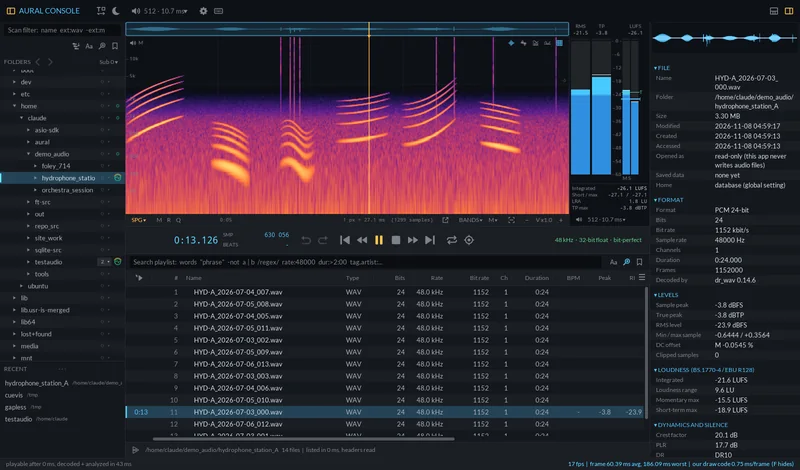
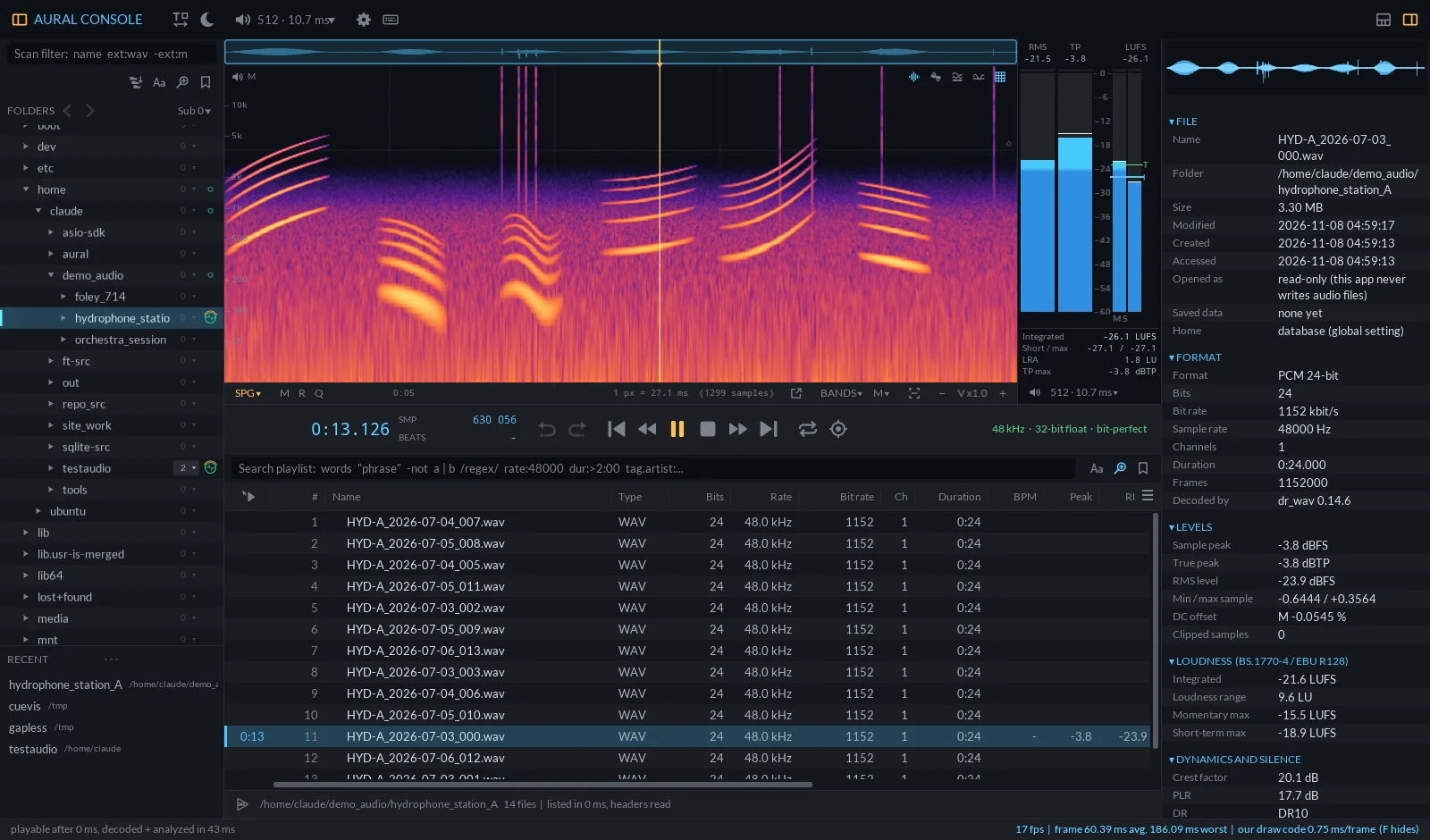
Aural Console showing a hydrophone recording as a spectrogram, with loudness meters and an analyzed playlist Aural Console showing a hydrophone recording as a spectrogram, with loudness meters and an analyzed playlist
0bytes written to your audio files
4 stepsfrom a folder to a delivery with report
21professional export presets, editable as text
7.1.4immersive layouts, ADM, Ambisonics
Product

Watch it work

Recorded straight from the application. No mock-ups.

Library

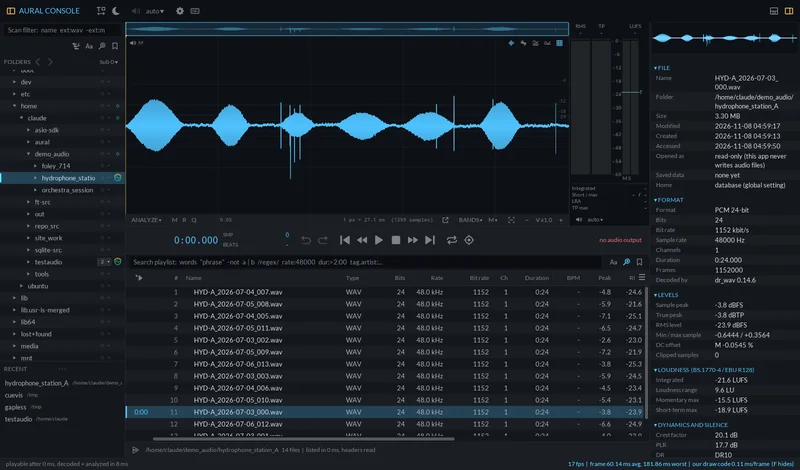
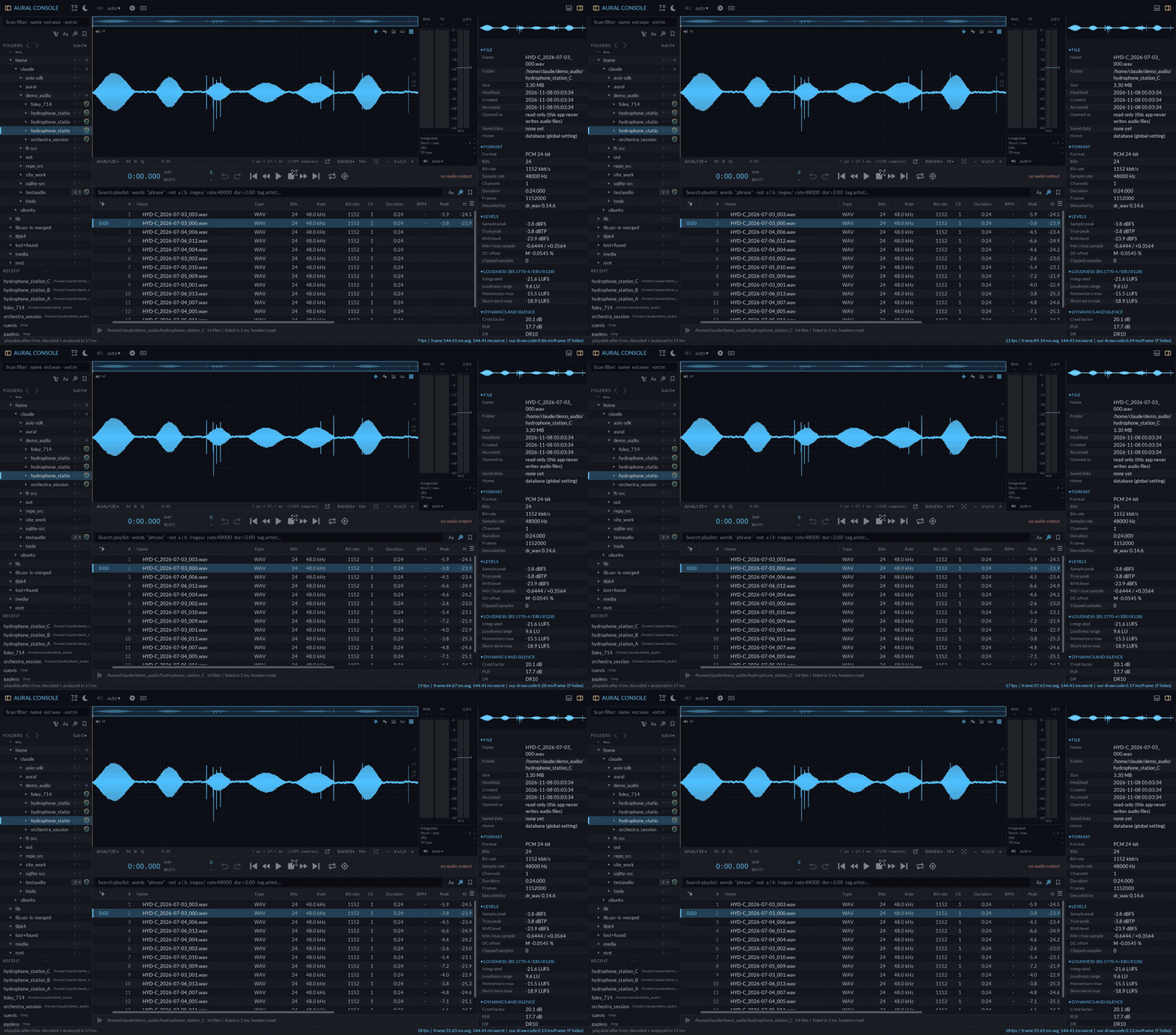
A hydrophone station, analyzed while it lists

Point it at a folder of field recordings and the playlist fills with peak, RMS, loudness, DC offset, clipping and tempo, while you already listen. Results are cached, so the second visit is instant.

Download as GIF
Science

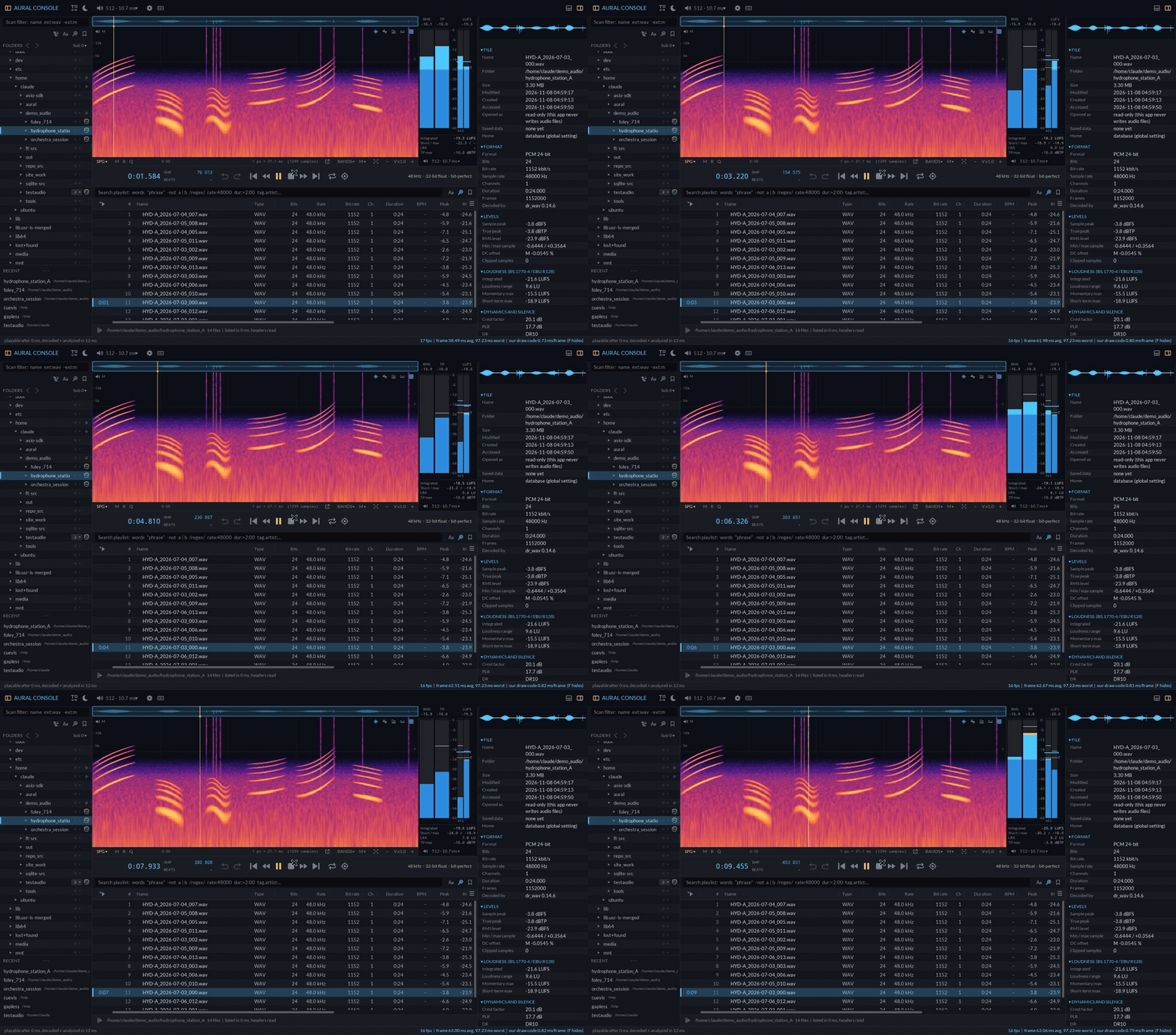
Whale song, in a live spectrogram

Song units, sweeps and clicks in a multithreaded spectrogram with its averaged spectrum, next to true-peak and loudness meters. Mark detections as cues and export them as CUE sheets or label tracks.

Download as GIF
Music

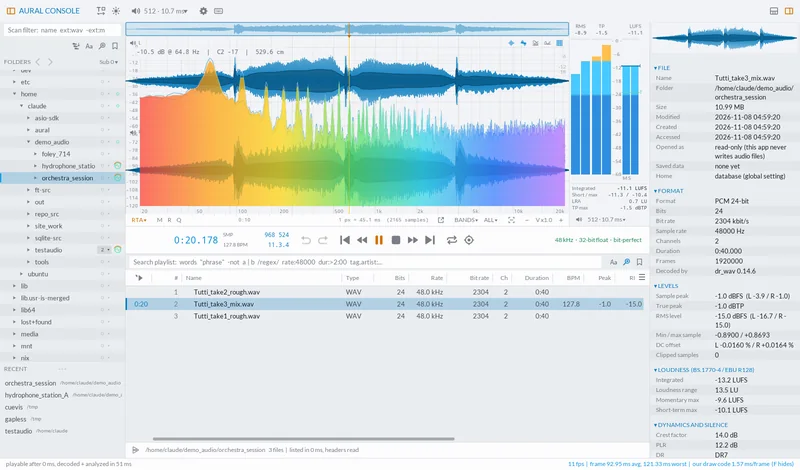
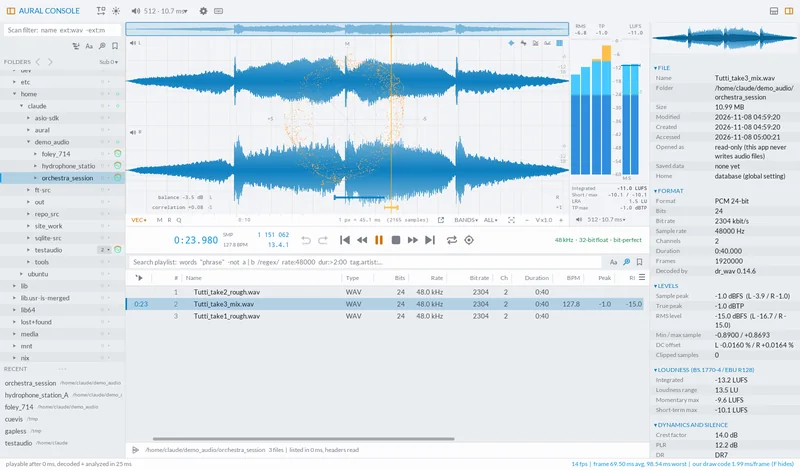
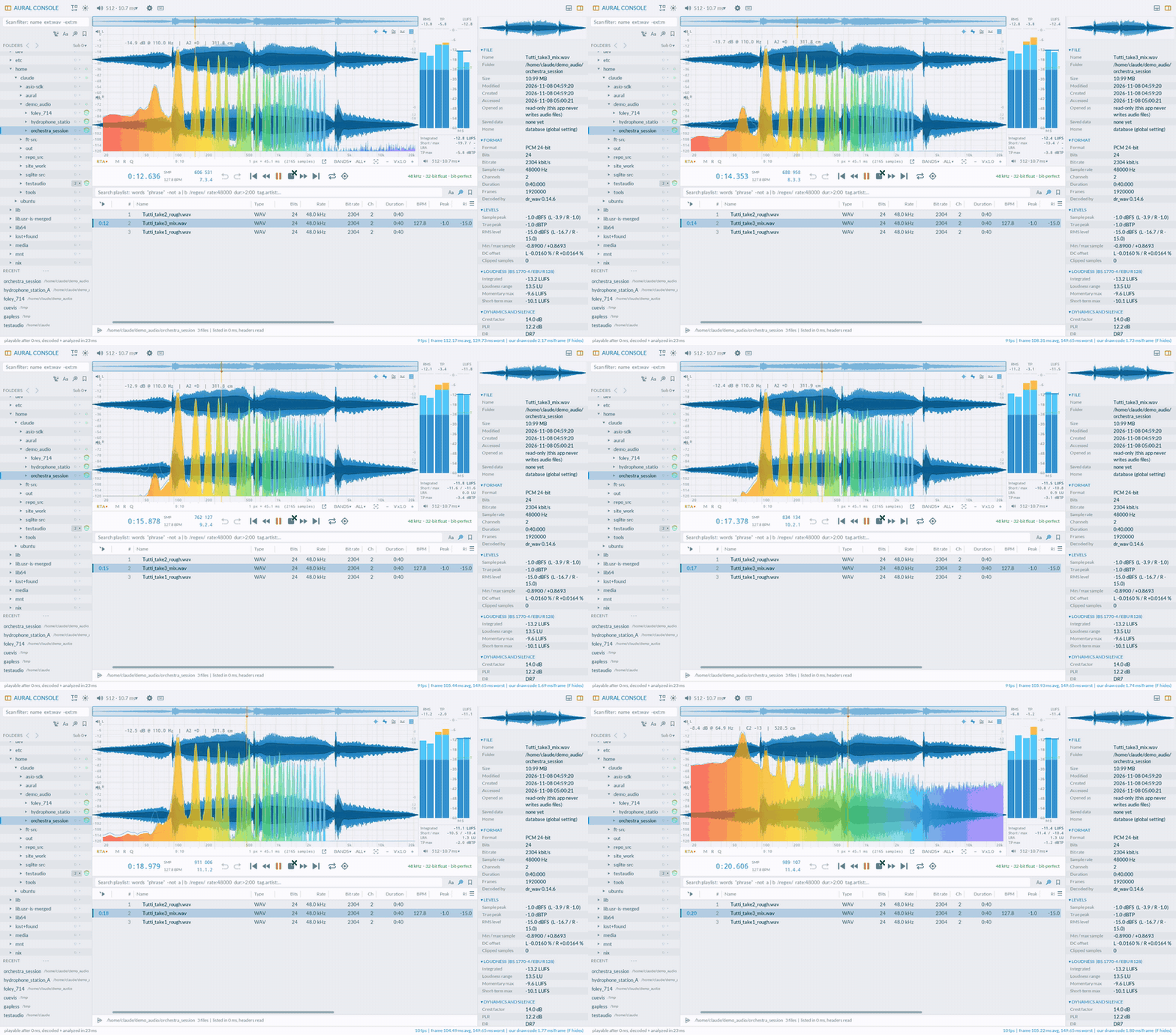
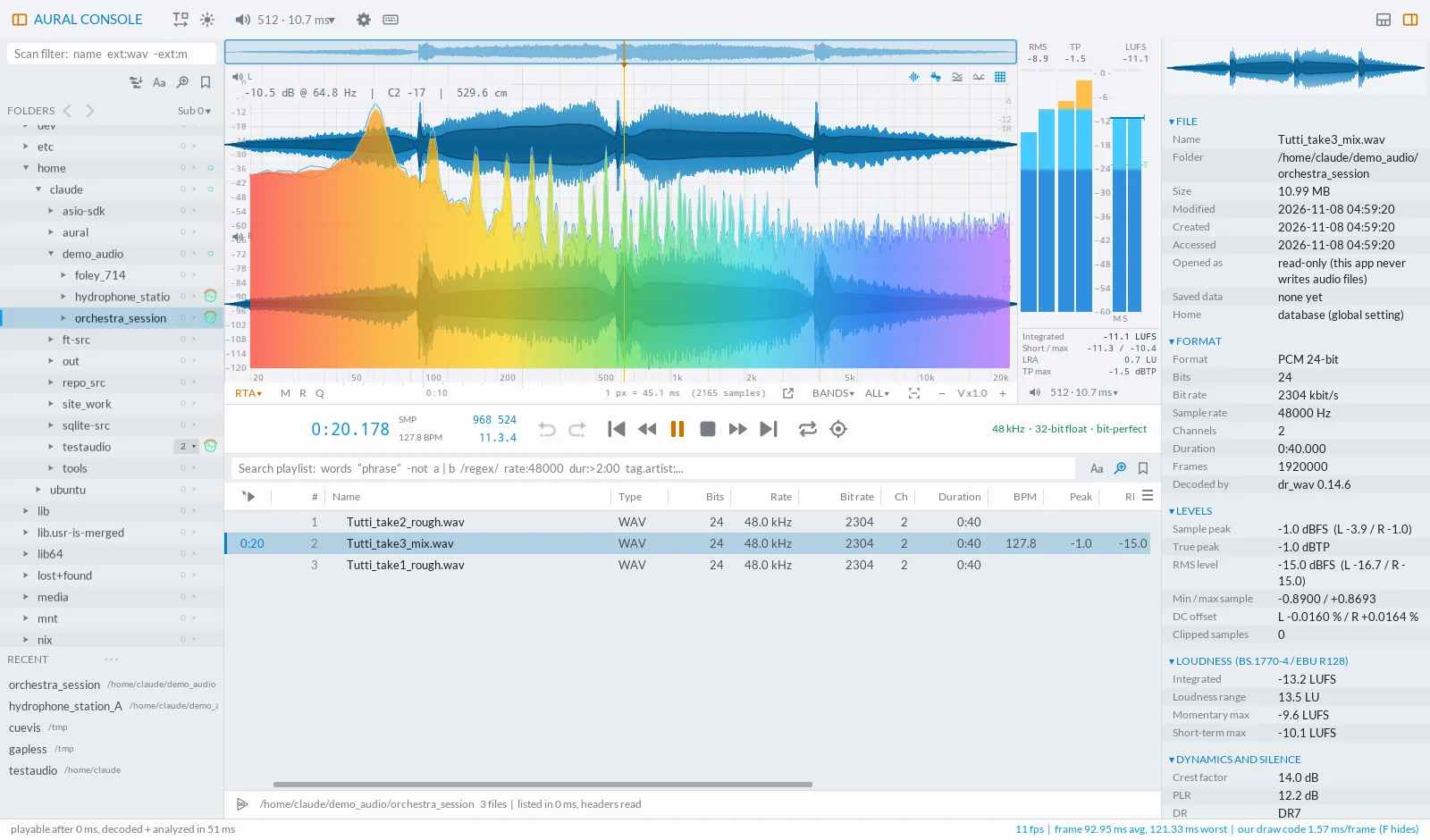
An orchestral tutti, from pianissimo to fortissimo

A real-time analyzer over the waveform, loudness range and true peak while the take plays: the quick check before a mix leaves the room. Here in the bright mode, made for projectors and daylight studios.

Download as GIF
Immersive

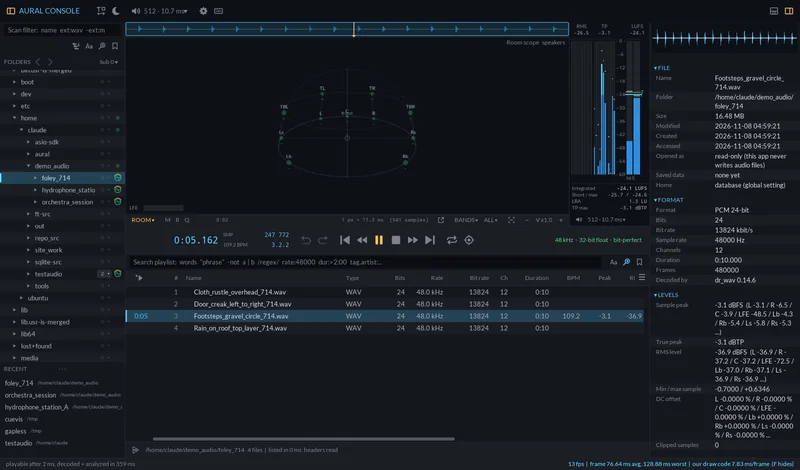
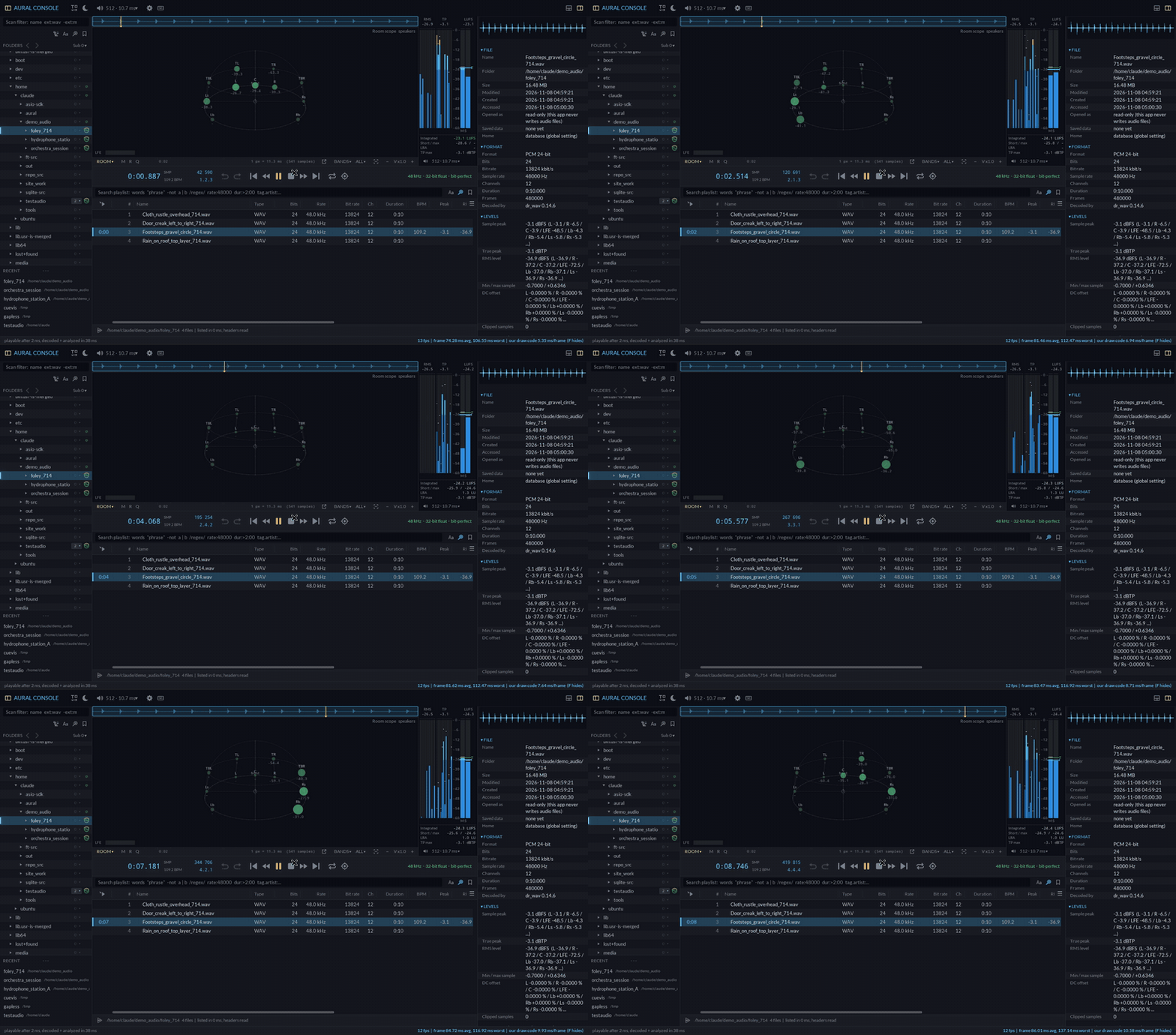
Foley in 7.1.4, seen in the room

The room scope places every channel where its speaker is (7.1.4, 5.1, ADM positions, Ambisonics) and shows where the sound comes from as it moves. Footsteps circle the listener; you see them do it.

Download as GIF
Capabilities

Built for critical audio departments. For live input or for large scale material. Plug a disk, and get a analyzed list in seconds for report.

Fast & smart browsing. Read-only by principle. Play on touch.

You choose the levels and the files you look for with scan and session presets you manage. History aware. Get an overview of your network in seconds. Audio files are opened read-only and never touched (if not wanted [lock]), not even their dates. Markers, regions, cues and notes live in a database, or a hidden folder or sidecar files: your choice, per folder or per file.

Measurements you can cite, far beyond common ground.

Broadcast and science report ready. Sample and true peak, RMS, DC, clipping, BS.1770-4 integrated loudness, LRA, PLR, DR, stereo correlation, bandwidth, noise floor, mains hum, placement in the room, effective bits and lossy-origin hints. Clipping detection, bitrate inconsistencies, noisefloors, dynamic summaries: Each value names its method.

Analyzers on stereoids

Real-time or on-pause. Live input or from files. Any you can think of. From 1 to 12 or more bands isolated. From mastering to print preparation up to science signal analysis. Spectrograms with LTAS, vector & wave scopes, nebula, wavelet scalograms, modulation spectrums, 3D room scopes and meta based sonar bearing. Placed over the live waveform (for field recorders), or own window groups for studio 2nd monitors

Band splits

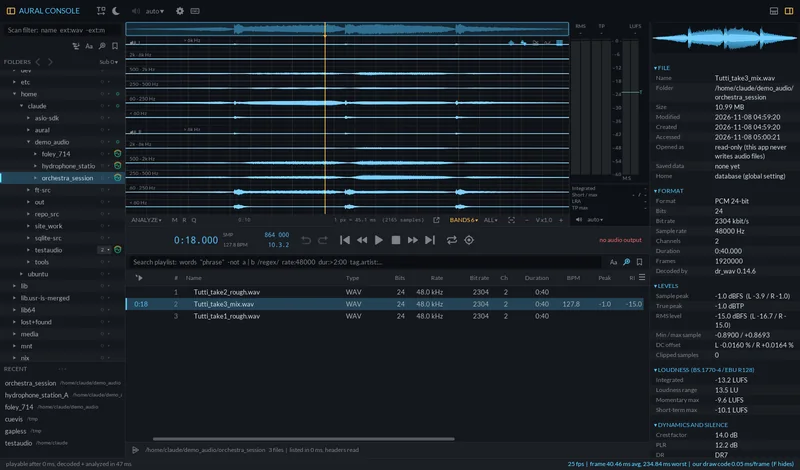
Split any view into 1, 3, 6 or 12 frequency bands with a flat-sum crossover: see where in the spectrum a problem lives, lane by lane.

Bit-perfect, gapless playback

Exclusive and ASIO output with exact routing, sample-exact loops, and gapless continuous play when the next file shares the format. Loop a region, a title or a whole playlist.

Library tools at scale

Virtualized playlists for 100,000 files, per-folder scan depths, a deep-scan switch, regex search across every tag, presets, recent folders and orphan detection for moved or renamed files.

Markers, regions, cues

Mark at the playhead, draw regions, add standard cue points. File cue chunks, AIFF markers and FLAC cue sheets are read; CUE sheets and label tracks are written next to your files on request.

Batch export with sidecars

User-editable presets and batches: web delivery with waveform peaks and chapters, EBU R128 and ATSC A/85 broadcast files, science copies with JSON, checksums and labels. Sample-exact cuts of every region or cue.

Reports that stand up

Detailed HTML and Markdown reports, analysis tables, loudness pass / fail, marker lists, integrity findings and full JSON, for one file, a region, or a whole archive.
Disciplines

Who it is for

One console, many disciplines. The same measurements, the same honesty about how they were made.

Bioacoustics and marine research

  • Audit passive acoustic monitoring archives folder by folder, at any depth
  • Spot dropouts, digital silence, DC drift, clipping and mains hum before analysis
  • Mark detections as cues; export them as label tracks, CUE sheets or per-detection clips
  • Sonar-style bearing display for multi-hydrophone arrays with known positions
Bioacoustics and marine research

Environmental and soundscape monitoring

  • Quality-check months of field-recorder files in one pass
  • Dataset export: regions as 16 kHz mono WAV with labels and SHA-256 checksums
  • JSON sidecars with source, method and measurements for FAIR, reproducible data
  • Works offline on the machine where the data lives
Environmental and soundscape monitoring

Health, hearing and speech research

  • Stimulus quality control: true peak, DC, clipping and level, documented per file
  • Speech corpus preparation with exact cuts and checksums
  • Local, read-only processing for sensitive recordings
  • A measurement and documentation tool, not a medical device
Health, hearing and speech research

Music universities and conservatories

  • Teach critical listening with analyzers students can see on a projector
  • Bright and dark themes with monitor gamma, brightness and contrast
  • Loudness and delivery checks for student productions, with readable reports
  • Archive ensemble recordings with markers, regions and notes
Music universities and conservatories

Professional audio libraries and archives

  • Integrity checks: RIFF structure, FLAC MD5, MP3 frames, bext and iXML
  • Catalogue-wide reports and tables for spreadsheets or databases
  • Web previews with waveform peaks and chapters for online catalogues
  • Lossy-origin and upsampling hints before material enters the collection
Professional audio libraries and archives

Broadcast and post production

  • EBU R128 and ATSC A/85 loudness reports with pass / fail
  • BWF deliveries with markers as cue chunks, MP2 playout copies
  • Immersive layouts: 7.1.4, ADM positions, Ambisonics in the room scope
  • Daily production line-ups: one folder, one click, one report
Broadcast and post production
Science grade

Science grade, by design

A number without its method is an opinion. Aural Console states how every value was measured, in the interface, in every report and in every export sidecar.

Integrated loudness
ITU-R BS.1770-4 / EBU R128
K-weighting, 400 ms blocks, absolute -70 LUFS and relative -10 LU gates
Loudness range
EBU Tech 3342
3 s short-term blocks, gated, 10th to 95th percentile
True peak
ITU-R BS.1770-4 annex 2
4x oversampled peak of the loudest channel
Loudness gain on export
Fixed gain
Target minus measured loudness of exactly that part; never a hidden limiter, and the report says when a target cannot be reached
Region cuts
Sample-exact
Cut on the source sample positions, not on rounded times
Checksums
SHA-256 / MD5
Of the final file, after markers were written into the copy
Originals are never writtenEvery export leaves a log of its exact commandsReports list their methodsText-based presets you can review and version
Workflow

From audio input or disk to delivery in four steps

01

Scan

Open a folder. Choose how deep, per folder, or switch on Deep to search everything below. Headers and tags arrive while you browse.

02

Analyze

Analyze the listed files: levels, loudness, dynamics, stereo, spectrum, authenticity, tempo and file integrity, cached for the next visit.

03

Mark and listen

Play bit-perfect and gapless, compare in the analyzers, mark markers, regions and cues, loop a region, a title or the playlist.

04

Report and deliver

Right-click a file, a region or the whole list: export presets, batches and reports with sidecars, checksums and a full log.

Interoperability

Formats and standards

Reads

  • WAV, BWF, RF64, BW64, W64
  • AIFF / AIFC
  • FLAC (with MD5 verification)
  • MP3, AAC, Opus, Ogg and more via FFmpeg
  • bext, iXML, ID3, Vorbis comments
  • ADM (axml / chna), Ambisonics AmbiX / FuMa

Measures

  • ITU-R BS.1770-4
  • EBU R128, EBU Tech 3342
  • ATSC A/85 checks
  • Sample and true peak, DC, clipping
  • DR, PLR, crest factor
  • Bandwidth, noise floor, hum

Writes (copies only)

  • BWF with cue / labl / ltxt chunks
  • CUE sheets, Audacity label tracks
  • WebVTT chapters, audiowaveform peaks
  • JSON sidecars, SHA-256, MD5
  • HTML, Markdown, CSV, JSON reports
  • Any FFmpeg format through presets
Screens

Screens

Documentation

Documentation

The essentials, page by page. Every page is plain JSON, ready to come from your own content source later.

Licenses

Licenses and support

This advanced audio tool is aimed for large scale professional user-groups and we are serious about personal life support. Therefore we sadly can not make it available for individuals. License and support plans will span from grouped recording or mastering studio bundles up to large film productions, universities, schools and research organizations.

In use internally and within partner organizations since 1998, and continuously developed. Coming soon to the public.

Studios

Recording and mastering studios
  • Per-room multi-machine licenses for engineers and producers
  • Live video support or studio visits.
  • Bit-perfect playback, analysis, reports and export ready for print
Ask about individual plans

Productions

Film, broadcast and post production
  • Team licenses for large productions and facilities incl. Networks
  • Priority support on live productions with individual support plans
  • Extended delivery presets for broadcast and immersive formats
Ask about individual plans

Education

Universities, conservatories and schools
  • Campus and school plans from 20 to 200 seats and more
  • Educational funding and sponsoring in cooperation with audio institutions
  • Teaching material on measurement methods, free workshops, certificates.
Ask about individual plans

Science

Research institutes, environmental and health organizations
  • Institutional plans for research groups and field teams
  • Field resaech and expedition personal assistance
  • Local, online and offline processing of sensitive recordings
Ask about individual plans

Pro Beta accreditation

Working in professional audio or science with aural or bioacoustic or audio physics aspects? Apply for accreditation as a professional beta user and work with Aural Console before the release. Accreditation requires really working in the professional audio field.

Apply for beta accreditation →
FAQ

Questions

Does it ever change my audio files?

No. Files are opened read-only and never written, not even their timestamps. Before the app first writes anything into one of your folders (sidecar data, exports), it records the folder's original dates in a log there.

Where are my markers and notes stored?

Your choice: a local database, a hidden .auralc folder, or sidecar files next to the audio, globally, per folder or per file. With sidecars you can also get standard CUE sheets and label tracks.

Can I add my own export formats?

Yes. Presets, batches and reports are plain JSON files you edit in any text editor. The newest defaults are always kept beside them for comparison.

Is the loudness normalisation a limiter?

No. It is a fixed gain from the measured loudness of exactly what you export. If the true-peak limit prevents reaching the target, the export says so instead of hiding it.

Is it suitable for clinical use?

It is a measurement and documentation tool for audio files. It is not a medical device and makes no diagnostic claims.

Which systems does it run on?

It is a native C++ application built for Windows first, with the same code base prepared for macOS and Linux.

Hear everything. Prove everything ... Now.

Every value states its method.

Audit, analyze, batch report, export and convert large professional audio inventories for broadcasting, scientific field research, post production, mastering, daily production line-ups and print.

Request a pilot →